Why this blog?
Until this moment I have been forced to listen while media and politicians alike have told me "what Canadians think". In all that time they never once asked.
This is just the voice of an ordinary Canadian yelling back at the radio -
"You don't speak for me."
email Kate
Goes to a private
mailserver in Europe.
I can't answer or use every tip, but all are appreciated!


Katewerk Art
Support SDA
Paypal:
Etransfers:
katewerk(at)sasktel.net
Not a registered charity.
I cannot issue tax receipts
Favourites/Resources
Instapundit
The Federalist
Powerline Blog
Babylon Bee
American Thinker
Legal Insurrection
Mark Steyn
American Greatness
Google Newspaper Archive
Pipeline Online
David Thompson
Podcasts
Steve Bannon's War Room
Scott Adams
Dark Horse
Michael Malice
Timcast
@Social
@Andy Ngo
@Cernovich
@Jack Posobeic
@IanMilesCheong
@AlinaChan
@YuriDeigin
@GlenGreenwald
@MattTaibbi
Support Our Advertisers

Sweetwater

Don't Run

Polar Bear Evolution

Email the Author
Wind Rain Temp
Seismic Map

What They Say About SDA
"Smalldeadanimals doesn't speak for the people of Saskatchewan" - Former Sask Premier Lorne Calvert
"I got so much traffic after your post my web host asked me to buy a larger traffic allowance." - Dr.Ross McKitrick
Holy hell, woman. When you send someone traffic, you send someone TRAFFIC.My hosting provider thought I was being DDoSed. - Sean McCormick
"The New York Times link to me yesterday [...] generated one-fifth of the traffic I normally get from a link from Small Dead Animals." - Kathy Shaidle
"You may be a nasty right winger, but you're not nasty all the time!" - Warren Kinsella
"Go back to collecting your welfare livelihood." - Michael E. Zilkowsky
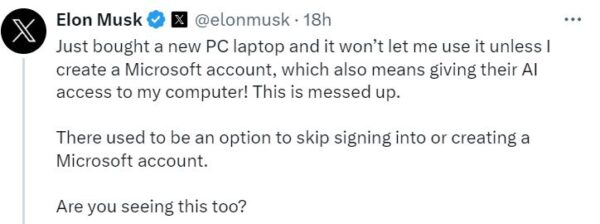

You used to be able to skip this by making sure you were not connected to the internet while setting up the computer…
I haven’t installed Win 11 from scratch yet… but disconnecting from the internet while installing Windows is good advice generally 😉
I can confirm that detaching from the internet works for a clean W11 install.
That works with Pro, but as I understand it it doesn’t work with Home, and Microsoft has implied that it won’t work with Pro for much longer.
The account (for whatever it’s worth) is only needed to authenticate. As soon as authentication is done you can convert to a local account through settings. They’re forcing account creation, but not logging in for use, but most people won’t know that that’s just a default setting that can be changed.
Install Linux Mint and avoid Microsoft
You beat me to it, Brian; we went with Ubuntu (Linux). and are pretty happy with it. LOTS of free and paid apps available for Linux OS. pretty much anything you need is out there.
https://arstechnica.com/gadgets/2024/02/what-i-do-to-clean-up-a-clean-install-of-windows-11-23h2-and-edge/
There are many more pages on the internet on how to avoid Microsoft’s account requirement.
There may not be a skip option offered upon initialising a retail purchase laptop with preinstalled Windows, but it is still fairly easy to avoid a Microsoft Account if you install Windows yourself (see the interwebs for instructions).
Maybe Musk can buy Microsoft and we can enjoy a popular and usable operating system that isn’t malware.
You do realize Microsoft’s Market Cap as of today is $3.05 Trillion.
Tesla is $631 Billion.
about 631 billion more than tesla is worth
Same goes for Microsoft!
– You do realize Microsoft’s Market Cap as of today is $3.05 Trillion.
That’s OK, Elon doesn’t buy things with his own money.
(he used to be called “subsidy fraud boy” around here)
https://www.smalldeadanimals.com/2024/02/23/i-for-one-welcome-our-new-self-driving-overlords-139/#comment-1866701
You evidently don’t know the difference between software and hardware. This is basically a regular X86 CPU, with no NPU doing this, because of software.
I’ve put it because it’s related to what MS does: “the real reason is not to help the consumer but control/apply boot on our faces forever. With no possibility to take it off.”
Ahh. My apologies.
That’s why you use Linux.
Linux is an option but if you need to collaborate, it may not be an option.
Been using it off an on since I had it on my 386-SX16, even compiled the kernel once. I have Ubuntu on one of my machines. Great Web surfer, server and all round general computer. Runs well on older hardware too.
I never did Windows. Apple II+ then Mac until ten or so years ago, Linux since then. Ubuntu on this machine, Debian on another. When I was in the Apple environment I ever had problems with collaboration, MacLinkPlus was there when I needed exchanges with PC machines.
OK, never did Windows is a wee stretch, the Debian machine is dual boot and I probanly booted Windows at least twice in the last 4 years.
Yep. Agree 100%
Currently waiting for the latest debian iso to download to install it another computer.
Gave up on Windows when I couldn’t secure Windows 10. Don’t miss it. I have one Windows computer for taxes and that’s it.
I bought a new Mac Mini last month. In order to use any Microsoft Office product you have to create a Microsoft account and buy a yearly subscription. I refuse to give one cent to Bill Gates so the old computer is still running my spreadsheets and the new one is used for the internet.
Tip, try LibreOffice.
I’ll second that.
Works well.
Ditto
Yep!
I stopped using Wintendo many years ago, Started using Linux in the 90’s, and never went back.
I gave in to Microsoft years ago. My wife gave in to Apple. Same shit, different operating system.
Mac uses a flavour of Unix since o/s 10 has been out (1999), they do use intel chips, however. You can put both operating systems on one machine using boot camp.
Miss the days of old Mac computing, with super fast and stable operating systems, new apple just isn’t as good, after Steve Jobs passed..
Adobe does the same, with subscription based applications, you don’t own anymore, you rent..
*Mac owner since 1986, never owned a PC..
My first computer was an Apple IIe (1982?). Learned 5 programming languages on that thing. Of course it had 196Kb of memory so a real killer.
Since the early 1990s I’ve been trapped in Microsoft-land mainly because of specialized software that only runs on Windows. My wife used to laugh when I updated the operating system because my software would no longer work. More recently (I would say within the past 2 years) she has had the same problem with Apple, even though all her software is Apple-developed.
I think everyone has sub-contracted their software programming out to Bangalore.
It’s not just new computers. Any significant new build that MS periodically uses to update your existing computer will experience the same “feature.”
Also, just about every laptop sold with MS OS already comes configured with the OS installed. Part of the license to sell the damn thing.
The only way to get around that is to zap your hard drive, and if you can get the original OEM DISKS, (I don’t know if booting from a USB stick will work on a virgin system) then go for it. I haven’t tried that trick myself of installing while the computer is disconnected, but I have no reason to believe it wouldn’t work.
I hv 30 yrs in this business (setting up new computers, re-doing OSes harddrives). From my experience, for personal/family use you cannot not use Microsoft. Unfortunately. But you can minimize Microsoft’s impact (and Google, FB) for your day-to-day:
– New laptop/desktop with Windows? Disable Cortana, disable all reporting auto-uploads, auto this&that, disable in services auto-google update, auto-AdobeReader update etc.
– Hold on to Win10 if you still have it. Do not upgrade to Win11.
– Make all wireless connections metered; this is the only sure way to limit Windows updates.
– Avoid Microsoft browser (1st and only thing I do with Edge/IE is download another browser Firefox usually and use that one from that moment on).
– Use Google.ca/.com only if I need to shop or search for locations. For everything else/80% rest – I use duckduckgo.com.
– As media app, I always download VLC. As mp3 player, foobar2000.
– No MSOffice thx. No 365 subscription either. I use LibreOffice (it’s able to save docx no pb), 7z, Notepad++.
– For Searches on my machine, I avoid MS Explorer. I use Agent Ransack.
– Need to save&encrypt stuff? No OneDrive, thx. External hdd/usbs and to encrypt, I use VeraCrypt.
– To use Ubuntu/etc, I typically install VirtualBox and go with VMs there.
Phew .. that’s quite a list when you buy a new Win11 machine. Both Microsoft and Google/YouTube have embarked in full press censorship (direct and indirect) by recording and monitoring user’s data and use patterns to develop algorithms to then influence the user.
Has Windows become Spyware?
https://www.youtube.com/watch?v=IT4vDfA_4NI
Most users have no concept of what is occurring on their PC in the background . They mostly write the odd letter or document , send/receive emails and spend a lot of time on the Internet. These users would be better served by installing the latest Linux Mint which is very “Windows-Like” without the hassle or spending a lot of money on new hardware to run the latest Windows O/S.
There’s an easy work around.
When prompted for the account, use no@thankyou.com and anything for the password.
It then defaults to a non ms account without being tied to an account.
Same thing with any updates that demand an MS account.
Geoff H
Apple protects its operating system with a hardware dongle, it’s called a Mac, lol.
There were ever only a couple “pay” for upgrades that i can remember, Snow Leopard and Lion, were the 2 biggest ones, as they provided the gateway to newer operating systems, but they soon went ‘free’ and even to this day you need not pay for them. There is no need to provide a ‘key’ to install an OS on a mac (see above).
That being said, I do prefer the older computers and operating systems, if it meets my needs, it meets my needs, only the apps that force you to upgrade, to remain current, in order to use your banking apps etc. are mostly on mobile systems like iPad and iPhone..
Currently have Debian 12.5 installed with the latest NVIDIA driver 550.54.14 graphics driver.
Steam runs most games well, and for the odd Windoze program there is Wine 9.3.
LibreOffice also works great.
Its been rock solid so far & no need for antivirus crap.
Just like I don’t trust Bill Gates for anti-virus management at the computer level, I wouldn’t trust him at the WHO either.
Cheers
C in C
1st St Nicolaas Army
Army Group True North
edit your .hosts file to include the following, which eliminates a lot of the spying MS does:
127.0.0.1 data.microsoft.com
127.0.0.1 msftconnecttest.com
127.0.0.1 azureedge.net
127.0.0.1 activity.windows.com
127.0.0.1 bingapis.com
127.0.0.1 msedge.net
127.0.0.1 assets.msn.com
127.0.0.1 scorecardresearch.com
127.0.0.1 edge.microsoft.com
127.0.0.1 data.msn.com
I have multiple computers, one running Windows 95 for some of the classic old games, and writing software
I have an old windows 3.1/Dos 6.2 which I boot up for fun. Some of that old software back in the freewheeling days was amazing.
I have a Windows XP model running for some old games, and data storage
I have another system running Windows 7 which is still pretty good
and finally I have two Linux setups one running Debian, and the other running Fedora.
Been programming since 1982, and still find it compelling.
type a@a.com and a bogus password and hit enter
then create the account you want.
Easy
Can’t wait till Elon’s brain chip gets access to my brain. So much easier.
Wait until he sees “CoPilot”! And OneDrive. And OneNote. Malware all. As mischief is important Kate, mayhap you could suggest that everyone ask copilot “Why did Microsoft install the malware called copilot?” in copilot, before editing the register to disable it. I’d suggest that on Twitter, but I’m not on Twitter anymore.
IIRC Chiefio considers Windows “the original computer virus”